Over 1000 video editing skills for your AI.
Hand it your video and get it back edited. Works in Claude today. For ChatGPT and Gemini, see what your plan can use.
Everything Claude can do with your videos.
- Presets396 skillsA whole video in one style
- Microskills619 skillsSingle techniques for any video
- Motion graphics49 skillsNumbers, charts, titles and styles
- Captions17 skillsOn the word and in the safe zone
- Transitions15 skillsCuts, zooms and rhythm effects
- Audio & SFX8 skillsMusic and effects on the beat
Over 1,000 skills. Claude picks the ones your video needs.
Each skill is a way of editing Claude learns with Cruto. Hand over the video and Claude decides what to apply. Your own rules always come first.
Presets · full videos · 396
- Hormozi captionsPunch-in zoom on a wordWord highlightJump cuts sin respiracionesEmoji que aparece en la palabra
Add Hormozi-style captions to this video - Viral copy
Edit it like this reel - Beat dropFotos al ritmo de la canciónDestello blanco de corteSilencio antes del remate
Make a beat drop with this line and my B-roll - Caption + movementKinetic titleBucle perfecto final-principio
Copy this dance with my avatar and put the text on top - Free styleVideo by @piensacondonnaJump cuts sin respiracionesPunch-in zoom on a wordWord highlightEmoji que aparece en la palabra
Edit this video with Cruto, your call - Viral mentorAcercamiento lento continuoKinetic title
Copy this negotiation viral with my mentor - Podcast with avatarB-roll en pantalla dividida con la caraWord highlightJ-cut (el audio entra antes)
My avatar on a podcast giving this tip - Fast top 5ChecklistCounting numberWhip pan between clipsSubida de tensión antes de revelar
Make a fast top 5 of AI tools with this audio
Microskills · techniques · 619
- Animación en holograma
Estilo holograma - Motion graphics: neon / cyber
Make the titles neon style - Motion graphics: paper collage
Make the titles collage style - Animación isométrica
Estilo isométrico - Animación en plano azul
Estilo plano azul - Animación en cámara térmica
Estilo cámara térmica - Animación anime
Estilo anime - Animación Matrix
Estilo Matrix - Animación en acuarela
Estilo acuarela - Motion graphics: 3D / clay
Make the titles clay style - Motion graphics: clean Apple-like
Make the titles Apple-like style - Motion graphics: brutalist
Make the titles brutalist style - Motion graphics: comic
Make the titles comic style - Motion graphics: glassmorphism
Make the titles glassmorphism style - Motion graphics: editorial / magazine
Make the titles editorial style - Motion graphics: flat / minimal
Make the titles flat style - Motion graphics: hand-drawn doodle
Make the titles doodle style - Motion graphics: data infographic
Make the titles infographic style - Motion graphics: bold kinetic type
Make the titles kinetic type style - Motion graphics: chalkboard
Make the titles chalkboard style - Motion graphics: retro 80s / VHS
Make the titles retro VHS style - Carrusel de tarjetas
Carrusel de tarjetas - Checklist de la IA editando
Checklist de edición - Counting numberVideo by @piensacondonna
Make 20,000 count up from 1 when I say it - Hand-drawn arrow or circle
Circle the price when I say it - Bar chart
Bar chart comparing these numbers - Word highlight
Make the key words yellow - Interfaz de render
Interfaz de render - Original y remake lado a lado
Original y remake - Checklist
Make a list with checks as I name them - Lower third
Put my name and “founder of X” at the bottom at the start - Phone notificationVideo by @piensacondonna
Show a sale notification when I say “first client” - Órbita de miniaturas
Miniaturas orbitando - Animated underline
Underline “free” when I say it - Tabla antes y después
Tabla antes y después - Tarjetas de prueba tras los hombros
Tarjetas detrás de mis hombros - Text behind the person
Put “FREEDOM” behind me in the hook - Tier list
Tier list at the end with everything I mention - Kinetic title
Animate this phrase word by word - Tweet
Show this sentence as a tweet - Widgets de cristal alrededor de la cabeza
Widgets de cristal - Reel motion graphics
Copy the graphics from this reel - Google searchVideo by @piensacondonna
Type the search like in Google - Freeze frame with labelVideo by @piensacondonna
Freeze here and write “me in 2019” - Glitch transition
Add a glitch between the hook and the rest - Speed ramp
Do a speed ramp on this car clip - Whip pan between clipsVideo by @piensacondonna
Join these two clips with a whip pan - Punch-in zoom on a word
Zoom in when I say “never” - Line chart
A line that grows when I say the result - Split screen slide-in
Bring in a split screen when I talk about the second one - Crossed-out price
Cross out €99 and show €49 when I say it - Card
Put the key fact on a card - Barra de progreso del vídeo
Barra de progreso - Botón de suscribirse animado
Botón de suscribirse - Cuenta atrás en pantalla
Cuenta atrás - Emoji que aparece en la palabra
Emoji en la palabra - J-cut (el audio entra antes)
J-cut - L-cut (el audio sigue después)
L-cut - Mapa con ruta animada
Mapa animado - Texto máquina de escribir
Efecto máquina de escribir
Talk to it normally. It edits like an expert.
Install Cruto in your Claude (Claude Code or claude.ai) and ask for whatever you want. Cruto picks the skills and Claude applies them to your video.
- 1Install Cruto in Claude Code or claude.ai
- 2Ask for the video the way you’d ask an editor
- 3Check the preview and download in 1080p
Edit it like this reel and add a number counting up from 1 to 20,000 when I say it.
- skill · copia-viral
- skill · tecnica-contador
- rules · safe zone and sync
Done: same captions, text hook and cuts as the reel, and the counter lands right on “twenty thousand”. Here’s the preview.
Illustrative conversation. The video is real: Celia’s recording and its edited version.
No endless mistakes. Like an expert.
Skills aren’t suggestions: they carry the rules a professional editor never breaks.
- Unbreakable rulesInstagram and TikTok safe zone, captions on their word and audio that never drowns the voice.
- Exact copy of the reelFonts, colours, position, cut rhythm and effects measured from the original.
- Adapts to your footageClaude spreads the style across your clips, whatever their length.
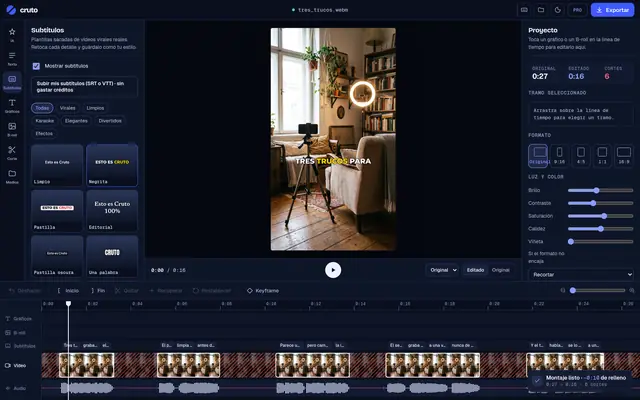
- Quick manual fixesWant to change something? Open it in the editor and fix it in seconds.
Editing a reel well takes hours.
Editing it yourself takes 1 to 3 hours per reel. An editor costs €300 to €800 a month. And hardly anyone knows how to copy the style of viral videos. With Cruto it takes about 5 minutes, and it spends no AI credits generating video because it edits your footage.
| What we compare |  cruto | Edit it yourself | Hire an editor |
|---|---|---|---|
| Time per reel | ≈ 5 min | 1–3 h | Days |
| Cost | From €0 | Your hours | €300–800/mo |
| Copies the exact style of a viral | Yes | No | No |
| Adapts to several clips and any length | Yes | No | Yes |
| No editing skills needed | Yes | No | Yes |
| You don’t depend on anyone’s schedule | Yes | Yes | No |
Start for free. Pay when you post more.
VAT included. Cancel anytime. Editing with skills spends no credits: your plan sets how many skills and videos you get. Only Studio’s AI generation has a balance.
Free
€0forever
No card needed
3 videos a month, with watermark
- 25 basic skills: cuts, captions and zooms
- Editor for manual touch-ups
- Cruto connector and skill in Claude
- Automatic captions: 30 min a month
Creator
€19per month
€15/month billed yearly
30 watermark-free videos a month
- 300 skills: essential microskills and the most viral presets
- Your rules above everything
- Editor for manual touch-ups
- Recommended
Pro
€39per month
€31/month billed yearly
Fair use (≈ 100 videos a month)
- All skills (1,000+) and every new one
- Mimesis, Mitosis and AI Director
- Post to your socials from Cruto
Studio
€99per month
€79/month billed yearly
5 brands or people
- Everything in Pro
- AI generation: 2,000 credits of balance a month
- Your rules as a private skill and direct support
What is a Cruto skill?
A way of editing Claude learns with Cruto. There are presets (a complete video in one style, like “Hormozi captions” or “beat drop”) and microskills (a single technique: a number counting up, a zoom on a word, a crossed-out price). You don’t need to ask for them: Claude picks and applies what your video needs, always below your own rules, which come first.
Does it copy the viral video itself?
No. It copies how it’s edited. Your images and your voice stay yours; only the style comes from the reel.
What if my video is longer than the reel, or several clips?
Claude adapts the edit: it orders your clips and spreads the style across your video, longer or shorter.
Can I tweak the result?
Yes. Every video opens in Cruto’s editor so you can change a cut, a caption or the text hook by hand.
Where does it work best?
In Claude Code, on your computer: install the skill or the connector and paste the reel. It also works on claude.ai and Claude Desktop with the connector.
Do I need to know how to code?
No. You copy one command once, then talk to Claude normally: “edit this video like this reel”.
Does it use AI credits?
No: editing with skills spends no credits. Your plan sets how many skills you have and how many videos a month. Only AI generation (images, video, voice) has a balance, included in Studio. See how it’s paid.
Do I need a card to try it?
No. The Free plan needs no card and includes the full editor with 3 videos a month without watermark.
Want to tweak something yourself?
Open it in the Cruto editor and make quick fixes by hand, no AI: fix a caption or the hook, move a text, trim a part, remove a zoom or a B-roll, or turn the music down. Free.
Can I cancel?
Anytime, from your account. You have 14 days to withdraw.
From 2 hours editing to 5 minutes.
Install Cruto in your Claude and ask for the video like you would a pro editor.
Install in Claude Code