Paste a viral reel. Claude edits your video the same.
Install Cruto’s skill or connector, give Claude your raw video and a viral reel, and Cruto edits it in that exact style, end to end (captions, text hook, cuts, zooms, music and sound effects), in about 5 minutes. The best experience is Claude Code on your computer.
Edit my raw video like this reel: [link]. Hormozi-style captions and a number counting up to 20,000 when I say it.
 cruto · skill copia-viral
- cruto · skill subtitulos-hormozi
- cruto · skill tecnica-contador
- cruto · vista_previa
Done. I used three Cruto skills: copia-viral for the reel’s style, Hormozi captions in the safe zone and the counter, which lands right on “twenty thousand”. Here are a few preview frames: shall I render it?
One connection, for the AI you use.
The same Cruto URL works with any AI that supports remote MCP connectors. We start with Claude.
- ClaudeAvailable
claude.ai, Claude Desktop and Claude Code. Connect it in a minute with the steps below.
- ChatGPTComing soon
Business, Enterprise and Edu: an admin adds it. Plus and Pro, not yet.
- GeminiComing soon
Gemini CLI, in testing. The Gemini app does not support this connector outside the US yet.
- GrokComing soon
As soon as Grok opens MCP connectors to everyone.
Cruto’s editor, inside the chat.
Claude decides and Cruto edits. Editing spends no credits: your plan sets which skills and how many videos a month you get.
- Analyzes
Word-by-word transcript, silences, filler words, retakes, shots and face, plus a diagnosis of the hook.
Included in your plan - Cuts
Removes silences, filler words and retakes, or whatever parts you tell it to.
Free - Captions
Templates measured on viral reels, highlighted keywords and always inside the safe zone.
Free - Pinterest B-roll
Finds real videos and images on Pinterest and places them right on the sentence they illustrate.
Included in your plan - Cruto styles
Natural, Cinema, Ink, Whiteboard, Window, Serif card, Retro or Collage.
Included in your plan - Preview
Frames of the edit so Claude can see how it looks before rendering.
Included in your plan - 1080p render
Final render with a download link. If nothing changed, it reuses the last one.
1 video of your plan - Mimesis and Mitosis
Copies the editing of a viral reel and makes several versions with another hook, order or style.
From Pro
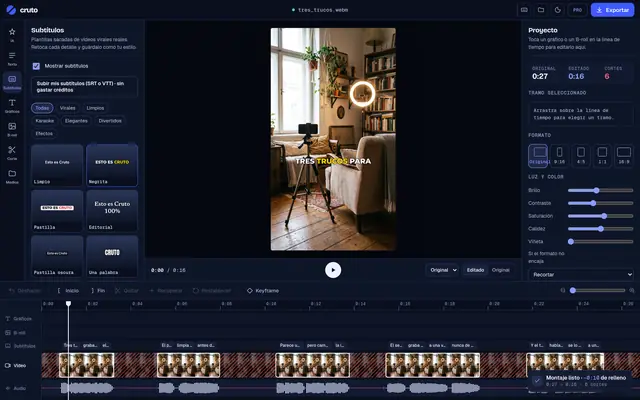
And the timeline shows up in the chat: you see it and touch it (cuts, captions, B-roll, zooms), and every change is free.
On claude.ai, in one minute.
- 1On claude.ai, open Settings → Connectors.
- 2Click “Add custom connector”.
- 3Paste the URL of Cruto’s connector.
- 4Click “Connect”, sign in to your Cruto account and authorize.
https://mcp.crutoai.com/mcp- Claude with custom connectors (Claude’s paid plans).
- A Cruto account from the Creator plan: analyzing, the preview and the render use Cruto’s cloud. Each render counts as 1 video of your plan (30 a month on Creator; fair use on Pro and Studio). Mimesis, Mitosis and posting, from Pro.
The same connector, wherever you use Claude.
The connector you add on claude.ai is also in the Claude desktop app. Nothing else to do.
Add it with this command and sign in to your Cruto account with /mcp:
claude mcp add --transport http cruto https://mcp.crutoai.com/mcpWith the Cruto desktop app (Pro and Studio): File → “Connect with Claude…”. It cuts, captions and renders without a style on your computer, without uploading the video. Arrives with the next version of the app.
Examples to get started.
Analyze my latest video and remove the silences and retakes.
Add captions with the “limpio” template and highlight the keywords.
Find Pinterest B-roll for the sentence about the contract and put it there.
Copy the editing of this reel and apply it to my video: [link]
Make me 3 versions, each with a different hook.
Edit my latest video with the Cinema style and post it to my TikTok as private.
Is it safe?
Yes. You connect with OAuth: you sign in to your Cruto account on Cruto’s website and authorize Claude; your password never goes through Claude. You can remove the connector anytime in Claude’s settings.
How much does it cost?
Editing spends no credits. Each plan has its skills (25 on Free, 300 on Creator and all of them on Pro and Studio) and its videos a month: each render counts as 1 (30 on Creator; fair use, ≈ 100, on Pro). Mimesis, Mitosis and posting come with Pro. What Claude thinks runs on your Claude plan.
Want to tweak something yourself?
Open it in the Cruto editor and make quick fixes by hand, no AI: every reply carries the “Open in the editor to tweak by hand” link. Fix a caption or the hook, move a text, trim a part, remove a zoom or a B-roll, or turn the music down. Free.
Your editor, in your chat.
Connect Cruto to Claude and edit your next video by talking.
Install in Claude Code